
Crew time tracking for contractors.
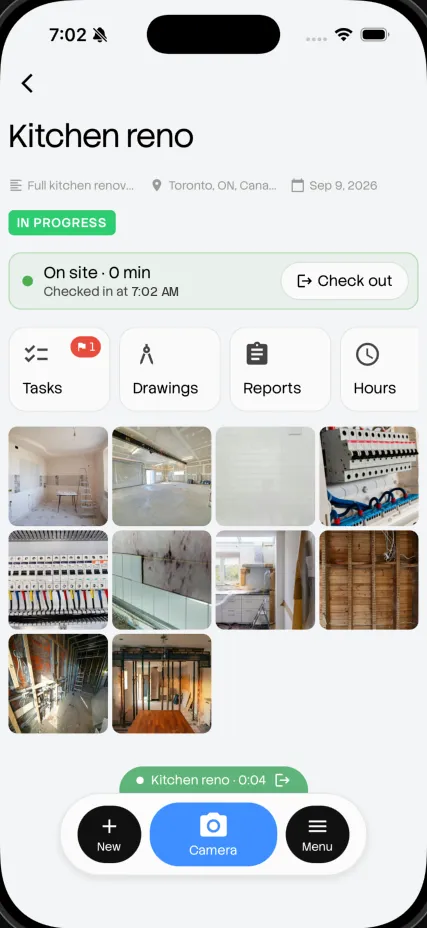
One tap in. One tap out.
Your crew checks in and out on site from their phone. You see hours by person and by job, and learn how long your jobs really take.
No credit card. Free for a month.
No more timesheets
A week of hours, without a single timesheet.
Hours fill themselves in as your crew checks in and out. Friday, the week is already added up.
Kitchen reno · this week
Sep 28 to Oct 2
| Crew | Mon | Tue | Wed | Thu | Fri | Total |
|---|---|---|---|---|---|---|
| Marco | 1h | 9.5h | 1h | 8h | 9h | 46.5h |
| Priya | 9.5h | 9h | 9.5h | 8h | 8h | 44h |
| Dev | 8h | 8.5h | 7h | 8h | 6h | 37.5h |
| Sam | No hours | 6h | 8h | 8h | 7h | 29h |
| Crew total | 27.5h | 33h | 34.5h | 32h | 3h | 157h |
How it works
Two taps a day. That's it.
-
Step 1: Check in on arrival.
One tap when the crew gets to site. Hours start counting against that job.
-
Step 2: Work the job.
Photos, tasks and hours all land on the same project.
-
Step 3: Check out.
One tap at the end of the day. Hours go straight into the daily report.
Quote with real numbers
Learn how long jobs really take.
Every job keeps its crew hours. Next time you quote a kitchen, look at what the last two actually took, not what you guessed.
Crew hours per job
-
Kitchen reno, 42 Maple St186h
-
Kitchen reno, 9 Birch Ave164h
-
Bathroom reno, 17 Oak Rd92h
Hours next to the work
See what the hours actually produced.
Hours by person and job
Daily and weekly summaries show who worked where, and for how long.
Next to the photos and tasks
Hours sit beside that day's photos and finished tasks, so you see what the time produced.
In every daily report
Crew hours are added to the day's report automatically, with the work that got done.
No chasing on Friday
No texts asking who was on site Tuesday. It's already recorded.
Where it fits
One part of your crew's day.
- 7:00 AM Check in
- 7:15 AM Photos
- 10:30 AM Tasks
- 10:31 AM AI check
- 1:00 PM Drawings
- 3:30 PM Client update
- 5:00 PM Daily report
- While you sleep Portfolio
Common questions
Is it hard for my crew?
No. It's one tap to check in and one to check out, on the phone they already carry.
Can I see hours by job?
Yes. Hours are grouped by person and by project, daily and weekly.
Do hours show up in the daily report?
Yes. Each daily report includes the crew's hours for that day.
Can I export hours for payroll?
Yes. Export your crew's hours any time and use them to run payroll.
It just works.
Check your crew in tomorrow at 7:00 AM.
Get started freeNo credit card. Free for a month.